




Summarize this content with artificial intelligence!

Model Context Protocol, in other words Model Context Protocol (MCP), has been quite popular recently. It's constantly being discussed on LinkedIn. So what exactly does it do?
LLMs are almost useless on their own. For example, if you tell ChatGPT "Send me an email," it cannot. It only writes a response because LLMs only predict the next word.
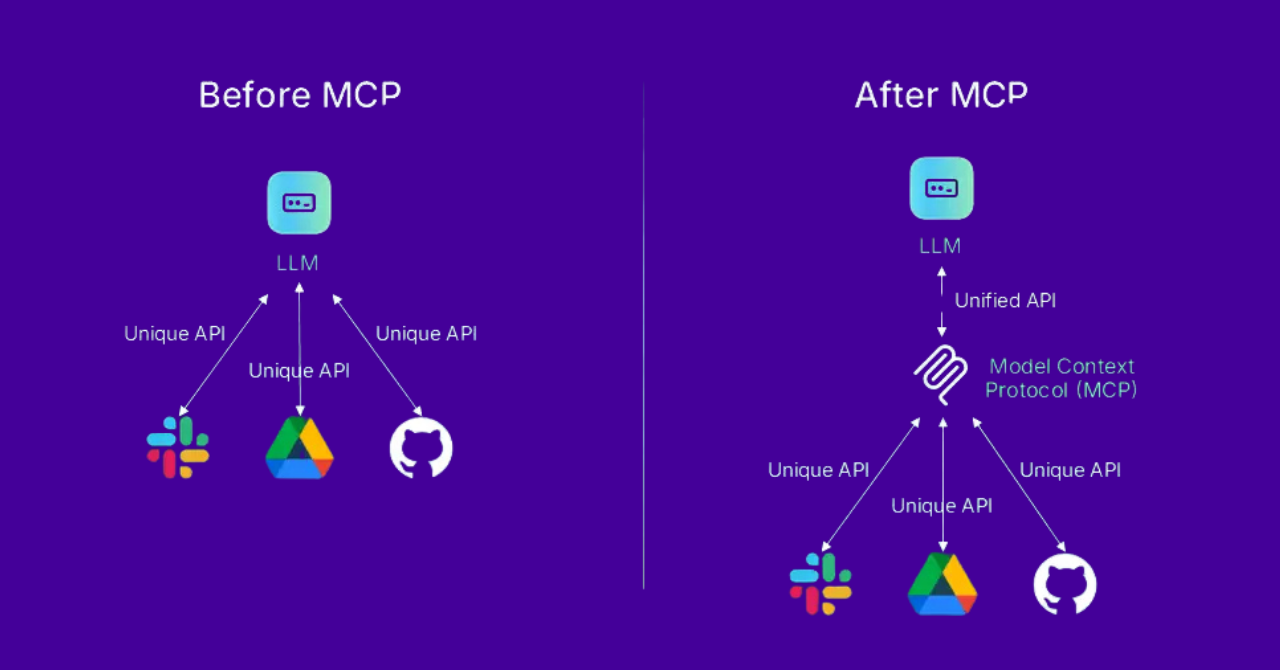
Over time, developers began to connect LLMs to external services. For example, an LLM that can search the internet, a system that receives emails and writes them to a table... but the problem is this: Connecting multiple tools to an LLM is tedious and very prone to errors.
This is where MCP comes into play. Let's imagine MCP as follows:
- Each tool speaks a different language (English, Spanish, Japanese, etc.).
- MCP translates these different languages into a single language that the LLM can understand.
In other words, Model Context Protocol (MCP) provides the additional information that AI models need and enables these models to perform real actions on other applications. Thus, LLMs
- Can add records to a database,
- Can read messages from Slack,
- Can enter meetings into Google Calendar.
In this article, we will not stop with this definition but will delve a little deeper into MCP. Now let's examine what MCP is, how it works, and why it is important together. 👀
What is Model Context Protocol (MCP)?
Model Context Protocol (MCP), developed by Anthropic, is an open standard developed to integrate artificial intelligence models with external data sources.
Its main purpose is to enable large language models (LLMs) to interact with APIs, databases, and business applications. (Let us leave a small note: to read more in detail about LLMs, you can visit our article.)
MCP provides AI tools with both understanding and action capabilities, offering more useful, meaningful, and proactive AI experiences.
Imagine an assistant that needs to make reservations on behalf of a restaurant manager. This assistant will call the restaurant, ask for available times, and reserve a table. MCP comes into play exactly at this point: it is a system that allows AI assistants to access the information they need to perform their tasks (such as the restaurant's phone number). In other words, MCP is a way to tell AI, "Here's the number so you can call the restaurant."
Speaking of Anthropic, Anthropic is an AI research and development company founded in 2021. In fact, it would be accurate to define Anthropic as the company that developed and offers MCP.
Initially developed to enhance Claude's ability to interact with external systems, Anthropic decided to make MCP open source in early 2024 to encourage its adoption across the industry.
By making MCP an open standard that everyone can use, they aimed to standardize the way AIs communicate with other applications, reduce reliance on proprietary integrations within each company's closed systems, and ensure that different AI applications are compatible and can work together.
After this step, some exciting applications developed with MCP began to emerge. For example, Blender-MCP.Blender-MCP allows Claude to interact directly with Blender and control it, providing instant-supported 3D modeling, scene creation, and editing capabilities.
Since becoming open source in late 2024, MCP has rapidly become an industry standard and has facilitated the more widespread use of AI agents.
What are AI Agents?
AI agents are artificial intelligence programs built on large language models (LLMs). These agents use the information processing capabilities of LLMs tocollect data, make decisions, and perform actions on behalf of humans. MCP, however, serves as a bridge that connects these agents with the "external world" beyond the LLM's training data.
How Does MCP Work?
In the above section, we discussed what MCP is. We also mentioned that it helps developers create secure connections between AI tools and external data sources, applications, and other services.
Let's move on to how MCP works.
MCP clients run within MCP hosts. Each client connects to a specific MCP server. ➿
Since the same host can run multiple clients, data can be received from multiple servers simultaneously. MCP servers also use APIs to fetch information from external systems.
This means that an AI agent can connect to multiple servers at the same time. However, these connections are independent of each other.
So what exactly are the components of this system? MCP follows a client–server architecture to connect AI models with external sources. There are three main components in this structure:
- MCP Host: An AI interface for users connecting to multiple MCP servers. (For example, the Claude desktop application, an IDE plugin, or a custom LLM-based application)
- MCP Client: An intermediary that manages secure connections between the host and servers with one client per server.
- MCP Server: Consider the server as a program that typically runs outside the model. An external program that provides specific capabilities connecting to various data sources like Google Drive, Slack, GitHub, databases, and web browsers.
What is MCP Used For? What Are Its Use Cases?

The following examples show how transformative MCP can be. As MCP develops, we will see it in many areas, from chatbots on websites to personal assistants and advanced code editors.
1. Enterprise Data Assistants
One of the strongest areas of MCP is AI assistants that provide access to corporate information. These assistants can securely access company data, documents, and services to answer questions or automate tasks.
Let's make it clearer with an example. A company chatbot can, within the same conversation, pull an employee's HR records from a database, retrieve project information from a project management tool, and share an update on Slack. All these operations occur in a standardized manner through MCP.
2. Software Development and Coding Agents
MCP is also rapidly being adopted in software development tools. GitHub Copilot, Replit AI, and Cody coding assistants are very useful for tasks like pulling code context and accessing documentation.
When MCP is integrated into an IDE, the AI can read relevant files in the project, run build/test commands, or search the version history. This makes the suggested code more accurate and better suited to the project's context.
3. Personal Productivity and Agents
MCP also enables personal AI agents to perform tasks across different applications. For example, imagine a virtual assistant: it will read your emails, add events to your calendar, update your to-do list, and control your smart devices. 📋
Normally, different integrations are required for these tasks. However, with MCP, separate servers can be created for applications like Gmail, Google Calendar, and task managers, allowing a single AI agent to coordinate all of them.
4. Data Analysis Tools
MCP is not limited to text and can also be integrated with tables, charts, and data analyses. For example, an MCP server can connect to a table or an analytics API to respond directly to data queries from AI with graphs or statistics. This makes AI more effective in many fields such as finance, healthcare, and education.
What Are the Differences Between MCP and APIs?
Many MCP servers use APIs behind the scenes to expose data and actions.
The difference between MCP and APIs is that MCP greatly simplifies integration by allowing AI assistants to use a single command set for all APIs.
While working with APIs requires writing custom code, with MCP, developers can achieve the same results by simply importing the MCP server. Additionally, switching between MCP servers is easy, whereas switching between APIs requires writing an entirely new set of code.
Summarize this content with artificial intelligence!


