

We wouldn’t be wrong to say that generative AI tools have become an integral part of our lives. Today, we use AI tools for many tasks even for simple queries.
One of these tools is Gemini one of the most compared AI systems to ChatGPT.
In this article, we explore what Google’s generative AI Gemini is, what it does, and how to use it. ✨
What is Google Gemini?
Google Gemini, formerly known as Google Bard, is an AI-powered chatbot developed by Google.
It can:
- Answer questions,
- Generate written content,
- Write code,
- Produce visuals.
For example, if you provide data to Gemini, it can create a graph or another visual representation for you, or help interpret existing charts.
Key Features of Google Gemini
Let’s take a closer look at its features to better understand Gemini 👀
1. Understands text, images, audio, and more
Gemini is a multimodal AI tool, meaning it can process multiple types of input (text, image, audio, etc.) simultaneously. You can upload an image or an audio file and communicate with it more naturally not just through text.
2. Fast, powerful, and efficient
According to Google, Gemini is five times more powerful than GPT-4 in terms of performance. Before being released, Gemini models were tested comprehensively across a wide range of tasks.
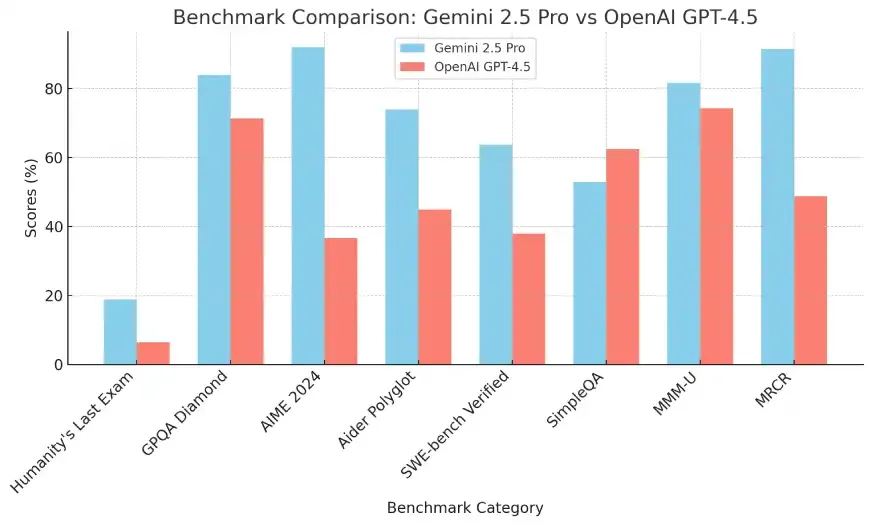
As shown in the comparison chart, Gemini 2.5 Pro (blue) outperforms OpenAI GPT-4.5 (red) in categories like analytical reasoning, multilingual capabilities, deep logic, and multimodal understanding. (More on that in a separate article. 🙂)
3. Complex thinking and reasoning
Gemini is trained on a massive dataset especially one that includes text and code. Thanks to this, it can access up-to-date information and provide logical answers to complex questions. (Details on the training data below. 🏋️)
4. Advanced code writing and understanding
If you're a developer or interested in coding, Gemini can really help. It can write high-quality code in Python, Java, C++, and Go and even explain it.
The Evolution of Google Gemini
Gemini represents the culmination of Google's extensive AI research. 🦖
Google’s journey in AI started with the launch of Google Brain in 2011, followed by the acquisition of DeepMind in 2014 the lab behind the Gemini model.
The Gemini chatbot was first introduced as Bard in March 2023. In December 2023, Google launched its most advanced LLM yet under the name Gemini, replacing Bard.

What Dataset Was Used to Train Gemini?
Google made an unprecedented investment in training Gemini reportedly five times the investment made in GPT-4.
The model was trained exclusively on Google’s latest AI processors: TPUv5 chips, which allow up to 16,384 processors to work in parallel.
That means this massive AI model was only possible thanks to the immense processing power of these chips.
While detailed training data hasn’t been fully disclosed, here’s what is known:
- Google reportedly has a vast dataset consisting entirely of code.
- The size of Gemini’s dataset is said to be four times larger than that used to train GPT-4.
- After processes like filtering, deduplication, cleaning, summarization, and noise reduction, the final training dataset is estimated to be around 65 trillion tokens.
Is Google Gemini Free to Use?
Yes, Google Gemini is free to use. However, users who want access to more advanced features can subscribe to a paid version, with prices varying based on the package.
With the free version, you can:
- Write prompts or commands for Gemini like:
- "Plan a trip for me."
- "Give me a short summary of historical events."
You can also work with images:
- Upload a photo from your computer or phone and ask questions about it.
Example: “What’s in this image?”, “What’s the translation of this text?”
You can also give visual prompts such as:
- “Draw an image of…” and Gemini can generate a completely artificial image for you.
Gemini also integrates with other Google services:
- It can search the web,
- Retrieve information from Gmail, YouTube, Maps,
- And offer richer, more up-to-date results.
Gemini vs GPT-4: Which One is Better?
The common question is: “Is Gemini better than ChatGPT?”
Both models support similar features handling text, images, video, audio, and code.
While both can be extended with plugins, Gemini has some limitations, 👎 but on the bright side, it integrates directly with Google services like Flights, Maps, YouTube, and Workspace apps. 👍
Also, studies suggest Gemini responds faster than GPT-4. However, due to high user traffic, it may slow down or go offline occasionally.
How to Use Gemini?
- Go to gemini.google.com and click “Sign In”.
- You can choose a different model than the default one by clicking the dropdown menu in your chat window.
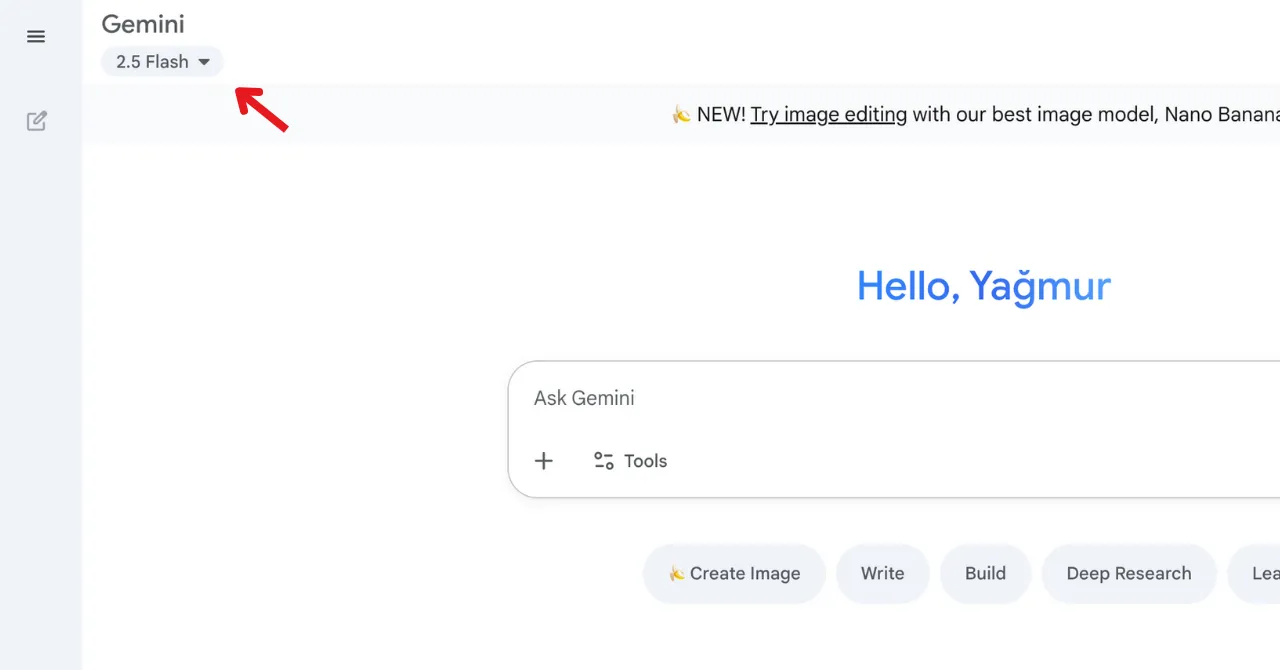
3. You can use Gemini in multiple ways. (Some features may only be available on web or mobile.)
- Type your message in the input field and click “Send.”
- For in-depth responses, use the Deep Research feature. Just click on the Tools tab and select “Deep Research.”
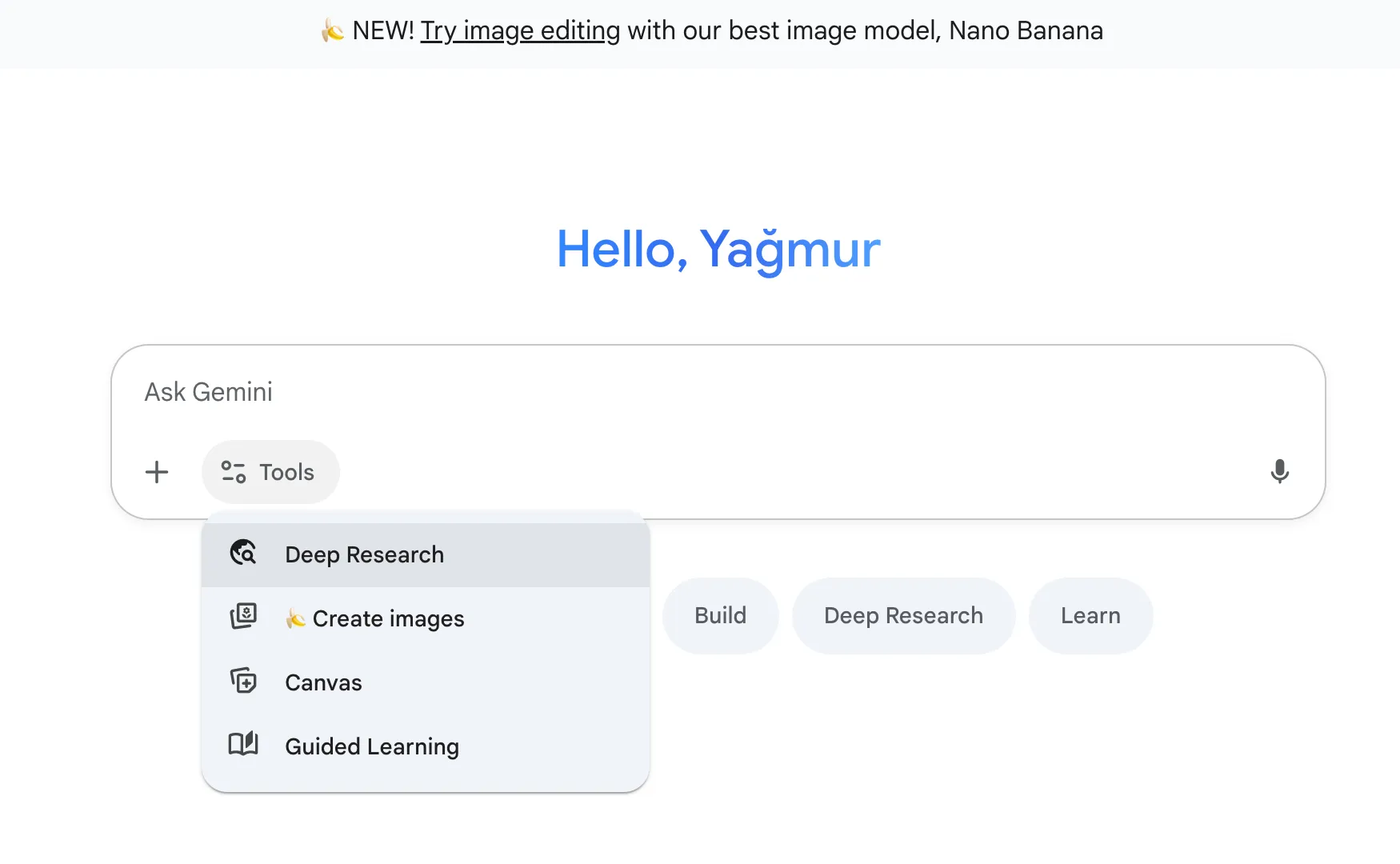
- To export Gemini's response to a document: Click “Canvas” from the Tools section. A new document will open, and you can continue editing there.
- To create images or videos: Use the “Generate image with Imagen” option in Tools.
- To interact with voice: Tap the microphone icon 🎙️ at the bottom right of the screen and speak your prompt.
- On mobile, you can also use Gemini Live (tap the icon at the top) to have a live conversation.
How to Generate AI Images with Gemini
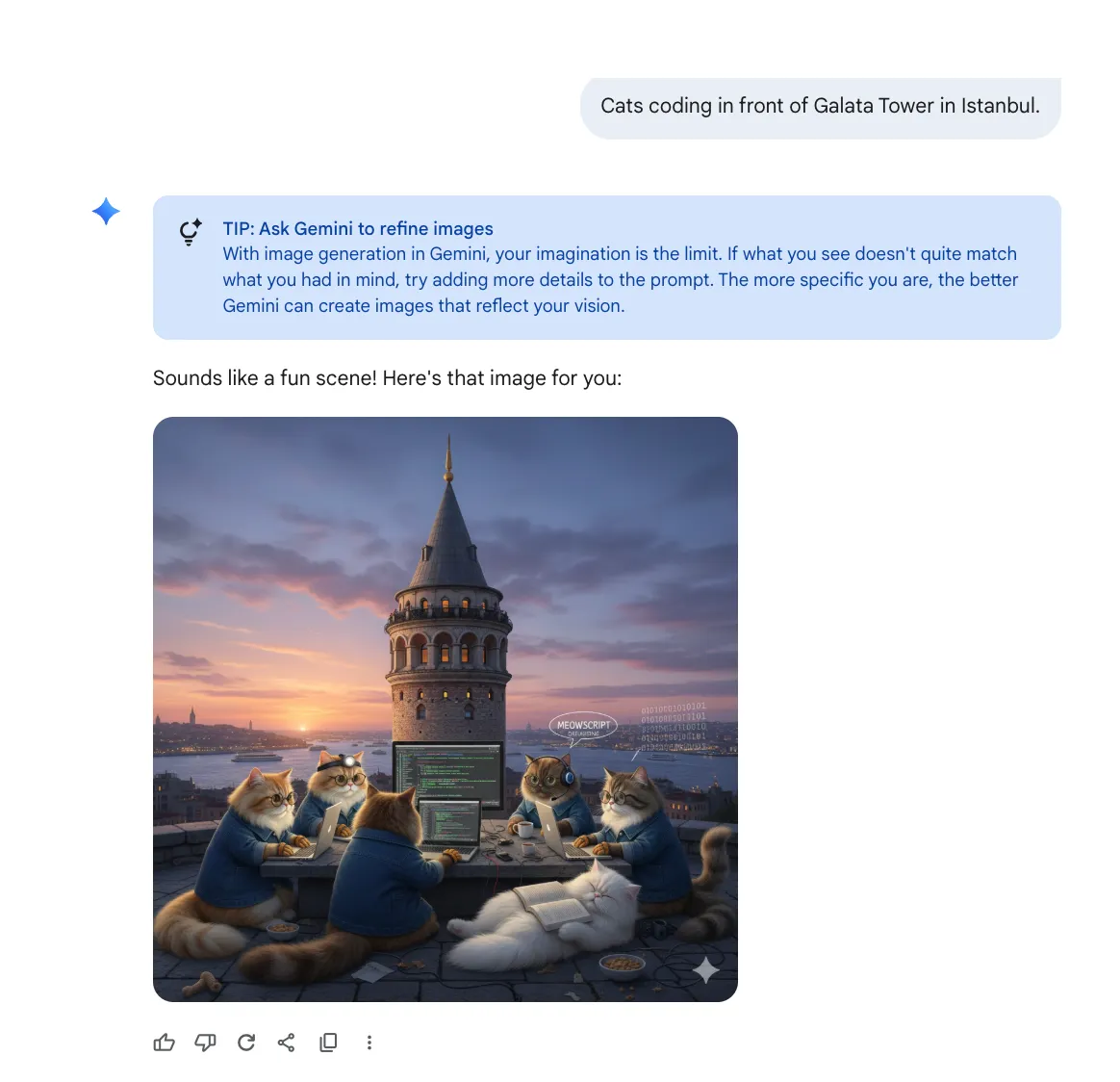
Gemini doesn’t just search the internet for images it can also create original AI-generated visuals, especially through Gemini 2.5 Flash.
Here’s how it works:
- First, describe the scene. For example:
“Cats coding in front of Galata Tower in Istanbul.” - Gemini then creates the image based on your description.
How to Turn Files into Audio Summaries with Gemini
If reading long PDFs or presentations feels exhausting, use the "Generate Audio Summary" feature. It allows you to listen to files as if they were podcasts.
Here’s how:
- Upload your file to the message input area.
- Click the “Generate Audio Summary” button that appears above the input box.
If the file is large, generating the summary may take some time. Once ready, you’ll hear it as a synthetic voice conversation.
You can listen via web or mobile, and even download the audio for offline use.
Conclusion
Gemini is Google’s latest multimodal large language model (LLM), replacing earlier models like LaMDA and PaLM 2.
Google defines Gemini as its most capable and comprehensive AI model to date.
Gemini can understand:
- Text
- Images
- Video
- Audio
- And complex topics like math and physics
It also writes high-quality code in popular programming languages like Python, Java, and C++.
For more reading, check out our related blog posts: