

With the rise of AI tools, developers' coding methods are undergoing a significant transformation. There are a variety of AI tools available to developers today, but in this article, we'll focus on OpenAI's Codex. ✨
Greg Brockman, OpenAI’s CTO and co-founder, views Codex as a tool to enhance developers' skills, especially helping them during the coding process. Codex understands context, responds to queries, and generates everything from simple functions to full-stack applications, making developers’ work easier. In fact, Codex aims not only to speed up professionals' workflows but also to assist amateurs who want to code casually.
What is Codex?
Codex is a cloud-based AI tool that can write and edit code, run tests, fix errors, and even suggest pull requests.
Though designed to assist developers in a variety of tasks, Codex can also be used by those who want to code casually.
After inputting a command in English, Codex performs tasks like creating simple websites or games or translating between different programming languages.
Recently released, Codex is powered by Codex-1, a version of OpenAI's o3 model specifically trained for software engineers.
What sets Codex apart is its ability to understand what you mean and convert that into working code across various programming languages. Unlike AI tools that generate only code snippets, Codex operates in a live environment. Additionally, thanks to GitHub integration, it can offer a pre-configured work environment with projects already loaded.
Codex supports programming languages such as Python, JavaScript, Go, Perl, PHP, Ruby, Swift, TypeScript, and Shell.

How Does Codex Work?
Codex runs on a secure virtual machine in the cloud. But what does that mean? Simply put, users don't need to install anything on their machines. While Codex works, you can continue using your system without interruptions.
Codex also supports multiple active tasks, so you can ask it to work on several issues at the same time.
One of Codex's Most Useful Features: GitHub Integration
One of the most useful features of Codex, in our opinion, is its ability to connect directly to GitHub. Using this feature, it's much easier to quickly access projects, edit code, and contribute.
Being able to analyze code on GitHub, understand projects faster, and make suggestions is incredibly beneficial. Additionally, reviewing error reports and proposing solutions saves time during the development process.
How to Set Up Codex?
Getting started with Codex is pretty straightforward. Here's a quick overview of the steps:
- Find Codex in ChatGPT
When you open ChatGPT, you'll see a "Codex" sidebar in the left navigation bar. Click on the Codex icon. - Authentication
After clicking Codex, you'll be redirected to another tab for initial setup. Click "Start" and, as shown in the next step, apply authentication. Click "Set up MFA to continue" and scan the QR code using an authentication app (such as Google Authenticator or Authy). Enter the code to verify. - Connect to GitHub
Once multi-factor authentication is complete, you can link Codex to your GitHub. Use the "Connect to GitHub" option to authorize Codex to read and write to your GitHub repositories. - Add Your GitHub Account
After connecting to GitHub, you need to add your account. Under the GitHub organization section, select "Add GitHub Account." This will redirect you to a new tab where you'll find the "Install and Authorize" option. Click it to authorize. You can also choose to authorize only selected repositories. - Create an Environment
Select the repository you want to work on and click “Create Environment.”
This will take you to the "Data Controls" section. Since Codex is still in active development, you might see a screen asking for permission to use your data for model improvement, but this is optional. You can turn this off and proceed. After that, you're ready to use Codex! 🥳
Codex vs Copilot: A Comparison
Here’s a quick comparison between Codex and GitHub Copilot:
|
Feature |
GitHub Copilot |
OpenAI Codex |
|
Code suggestions? |
✅ Yes |
✅ Yes |
|
Can run code? |
❌ No |
✅ Yes |
|
Can run tests? |
❌ No |
✅ Yes |
|
Understands the full codebase? |
❌ Partial |
✅ Full context analysis |
|
Autonomous operation? |
❌ No |
✅ Yes (with logs and review) |
Conclusion
Now that we've explored what Codex can do, it's clear that it has the potential to become an even more critical tool for developers, especially as IDEs and CI channels evolve. Even now, Codex has become much more capable thanks to significant progress in augmented learning.
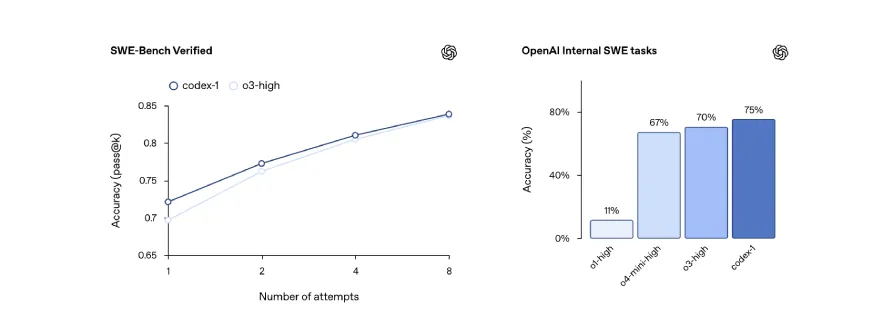
Codex-1 outperforms both standardized benchmarks and previous OpenAI models, achieving higher accuracy across all trial metrics in examples like the Codex-1 SWE-Bench Verified benchmarks.
For more information on Codex, we recommend reading the official release blog and checking out usage examples on OpenAI's YouTube channel.